
Transaction Feature – Discount Management
Transaction Feature – Discount Management
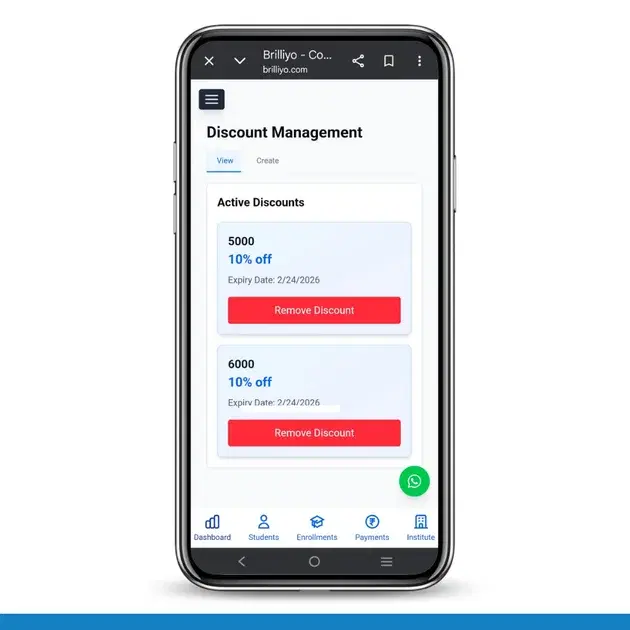
The Discount Management feature in Brilliyo allows institutions to create and manage fee discounts easily. It helps apply percentage-based discounts on student payments and control their validity through expiry dates.
This feature has two main sections:
- View
- Create
1. Create Discount (How to Add a New Discount)
This section is used when you want to create a new discount offer for students.
Steps to Create a Discount:
- Go to Transaction → Discounts.
- Click on the Create tab.
-
Enter the Discount Code
(Example: NEW50, FESTIVE10, etc.) -
Enter the Discount Percent
(Example: 10%, 25%, 50%, etc.) -
Select the Expiry Date
(After this date, the discount will automatically expire.) - Click on Add Discount.
✅ The discount will now appear in the Active Discounts section and can be applied while generating receipts.
2. View Discounts (How to Manage Active Discounts)
This section shows all currently active discounts.
Here you can:
- View the discount code
- See the discount percentage
- Check the expiry date
- Remove a discount if needed
To Remove a Discount:
- Go to the View tab.
- Click on Remove Discount.
- The discount will no longer be active.
How Discount Works During Receipt Creation
When creating a receipt:
- Go to Transaction → Receipts → Create.
- Select the student and enter the amount.
- Apply the available discount.
- The system will automatically calculate the discounted amount.
- Complete the receipt process.
In Short
- Create → Add a new discount with code and expiry date.
- View → Manage or remove active discounts.
- Discounts are automatically applied during receipt generation.
This feature helps institutions manage promotional offers, scholarships, and special fee reductions in a simple and controlled way.
Tags:
Related Documentation
Transaction Feature – Payment Management
The Payment Management feature in Brilliyo helps institutions record and manage outgoing payments such as general expenses and employee salaries. It ensures every payment is properly recorded with ledger tracking and accounting accuracy.
Transaction Feature – Receipt Management
he Receipts feature in Brilliyo helps institutions record and manage student fee payments easily. It ensures every payment is properly documented and stored securely.