
Brilliyo Placement Engine – Benefits and Dashboard Overview
What is the Placement Engine?
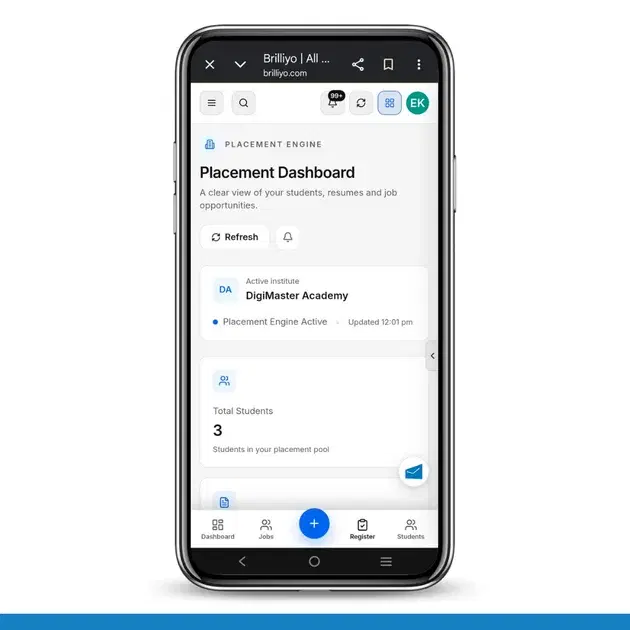
The Brilliyo Placement Engine helps educational institutes manage student placement activities from one place. It provides a clear overview of student profiles, resumes, job opportunities, and resume processing status through a centralized Placement Dashboard.
Institutes can use it to monitor students' placement readiness, identify incomplete profiles, track resumes, and keep an eye on available job opportunities.
Why Should Institutes Use the Placement Engine?
Centralized Placement Management: View important placement information from one dashboard instead of managing everything separately.
Student Profile Tracking: Monitor student profiles and their completion percentage to identify missing information.
Resume Management: Track uploaded resumes and monitor their processing status.
Placement Readiness: Identify students whose profiles need to be completed before they can be considered for relevant opportunities.
Job Opportunity Tracking: View recent job opportunities and access the jobs section to explore available openings.
Quick Status Monitoring: Get an overview of students, resumes, job opportunities, and profile completion at a glance.
Better Placement Coordination: Help placement teams organize student information and placement-related activities more efficiently.
What Does the Placement Dashboard Show?
The Placement Dashboard provides the following information:
1. Active Institute
Displays the institute currently using the Placement Engine.
Example: DigiMaster Academy.
It also shows whether the Placement Engine is active and when the dashboard was last updated.
2. Total Students
Shows the total number of students included in the placement pool. This helps the placement team understand how many students are being tracked for placement activities.
Example: 3 students.
3. Resumes Uploaded
Displays the number of resumes uploaded by students and the percentage of students who have submitted resumes.
Example: 0 resumes uploaded and 0% of students.
4. Job Opportunities
Shows the number of available job opportunities listed in the system. The dashboard also provides access to the jobs section to explore opportunities.
Example: 0 job opportunities.
5. Profile Completion
Displays the average completion percentage of student profiles. This helps institutes identify whether students have provided the information needed for placement consideration.
Example: 0% average profile completion.
Other Important Dashboard Sections
1. Student Profiles
This section provides a view of student profile completion and placement readiness indicators.
It includes:
Profile Completion: Average completion percentage across student profiles.
Students with Resumes: Percentage of students who have uploaded resumes.
Profiles Completed: Percentage of student profiles marked as completed.
View Students: Opens the student list for reviewing student information.
Keeping student profiles complete can help improve eligibility assessment and future job matching.
2. Resume Pipeline
The Resume Pipeline shows the current status of resume processing.
It includes three indicators:
Processed Successfully: Number of resumes processed successfully.
Processing: Number of resumes currently being processed.
Needs Attention: Number of resumes that require further review or action.
This section helps placement teams monitor resume processing and identify items that may need attention.
3. Recent Job Opportunities
This section displays recent job opportunities available in the system.
View All Jobs: Provides access to the full jobs section.
No Job Opportunities Yet: Appears when no job opportunities are currently available.
Institutes can explore the jobs section to find available opportunities for students.
4. Refresh
The Refresh button lets users refresh the dashboard to check for updated information.
How to Use the Dashboard Effectively
Open the Brilliyo Placement Engine.
Review the total number of students in the placement pool.
Check how many students have uploaded resumes.
Review the average student profile completion percentage.
Open View Students to identify profiles that may need additional information.
Check the Resume Pipeline for resumes that need attention.
Open the jobs section to explore available job opportunities.
Use Refresh to check for updated dashboard information.
Summary
The Brilliyo Placement Engine gives institutes a centralized view of student placement readiness, resume activity, and job opportunities. Its dashboard helps placement teams monitor student profiles, identify incomplete information, track resume processing, and explore available jobs more efficiently.
The result is better organized placement management and improved visibility into the steps students may need to complete before being considered for job opportunities.