
Transaction Feature – Payment Management
Transaction Feature – Payment Management
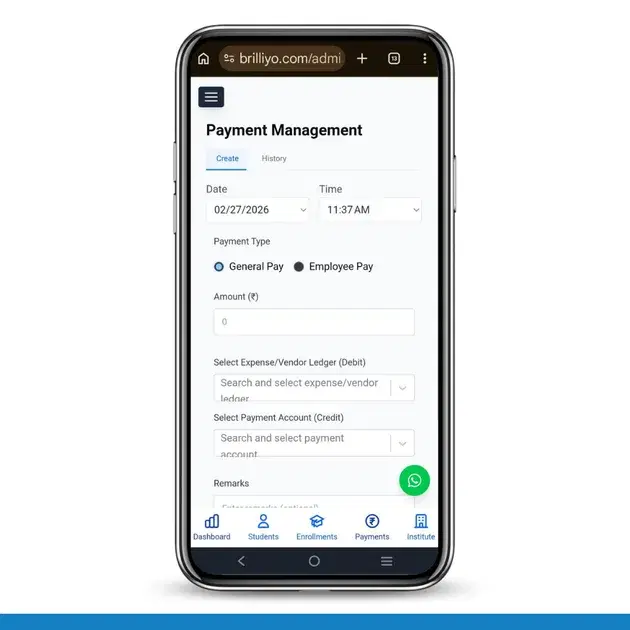
The Payment Management feature in Brilliyo helps institutions record and manage outgoing payments such as general expenses and employee salaries. It ensures every payment is properly recorded with ledger tracking and accounting accuracy.
This feature has two main sections:
- Create
- History
1. Create Payment (How to Record a New Payment)
This section is used when you want to process a new payment.
Step-by-Step Process:
- Go to Transaction → Payments.
- Click on the Create tab.
- Select the Date (auto-filled, can be changed).
- Select the Time (auto-filled).
-
Choose the Payment Type:
- General Pay (for expenses like rent, electricity, vendor payments, etc.)
- Employee Pay (for staff salary payments)
- Enter the Amount (₹).
- Select Expense/Vendor Ledger (Debit).
- Select Payment Account (Credit) (Cash or Bank).
- Add Remarks (optional).
- If applicable, enable Apply TDS (Tax Deducted at Source).
- Click on Process Payment.
✅ The payment is successfully recorded and updated in the accounting system.
2. Payment History (How to View Previous Payments)
This section allows you to track and review all past payments.
How to Use History:
- Click on the History tab.
-
Use filters:
- Search (by name or type)
- Start Date
- End Date
- The system will display:
- Payment Type
- Amount Paid
- Payment Date
- Navigate through pages if multiple records exist.
- Click Download Excel to export payment records.
If no records match, the system will show no results.
Payment Flow Explained (Accounting Logic)
- Debit → Expense or Vendor Ledger
- Credit → Payment Account (Cash/Bank)
This ensures proper accounting and financial accuracy.
In Short
- Create → Record new payments (expenses or salary).
- History → Track and download past payment records.
- Supports ledger-based accounting and TDS option.
This feature helps institutions maintain accurate financial records and manage expenses efficiently.
Tags:
Related Documentation
Transaction Feature – Discount Management
The Discount Management feature in Brilliyo allows institutions to create and manage fee discounts easily. It helps apply percentage-based discounts on student payments and control their validity through expiry dates.
Transaction Feature – Receipt Management
he Receipts feature in Brilliyo helps institutions record and manage student fee payments easily. It ensures every payment is properly documented and stored securely.