
Academics Feature – Create Question (Exam/Survey)
Academics Feature – Create Question (Exam/Survey)
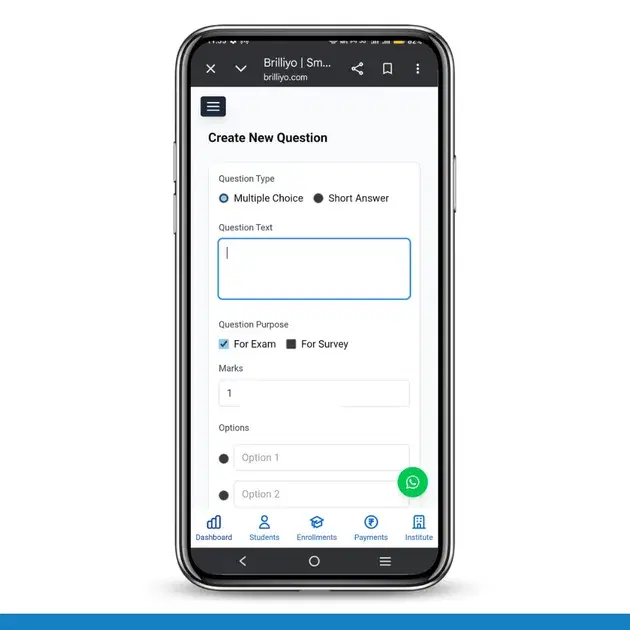
The Create Question feature in Brilliyo Academics (Exam/Survey module) allows institutes to create questions for online exams and surveys. Administrators or teachers can design questions, set marks, choose question types, and add options for assessments.
This feature helps in building structured question banks for exams and feedback surveys.
Key Options in Create Question
- Question Type Selection
- Question Text
- Question Purpose (Exam/Survey)
- Marks Allocation
- Options (for MCQs)
How to Create a Question (Step-by-Step)
1. Navigate to Create Question
- Go to Academics → Exam/Survey
- Click on Create Question
2. Select Question Type
Choose how you want the question to appear:
- Multiple Choice (MCQ) → Students select one correct answer
- Short Answer → Students type their answer
3. Enter Question Text
- In the Question Text field, type your question.
4. Select Question Purpose
Choose where the question will be used:
- For Exam → Used in tests with marks
- For Survey → Used for feedback
5. Set Marks
- Enter the marks/points for the question
6. Add Options (For MCQ Only)
- Enter Option 1, Option 2, etc.
- Click Add Option to add more choices
- Select the correct answer using the radio button
7. Create Question
- Click on Create Question
✅ The question will be successfully saved and ready to use in exams or surveys.
In Short
- Go to Exam/Survey → Create Question
- Select Question Type (MCQ / Short Answer)
- Enter Question Text
- Choose Exam or Survey
- Set Marks
- Add Options (for MCQ)
- Click Create Question
The Create Question feature in Brilliyo Academics makes it easy to build structured and flexible exam and survey questions.
Tags:
Related Documentation
Attendance Feature – Attendance Report
Attendance Feature – Attendance Report
Academics Feature – Assessment Link (Exam/Survey)
The Assessment Link feature in Brilliyo Academics allows institutes to create and share online exam or survey links with students. It provides full control over assessment settings, timing, question selection, and result delivery.
Academics Feature – Library Management
The Library feature in Brilliyo Academics helps institutes manage and share learning resources such as PDFs, documents, notes, and study materials with students in an organized way.