
Features
Attendance Feature – Attendance Report
1 min read
13 views
Esha
April 1, 2026
Attendance Feature – Attendance Report
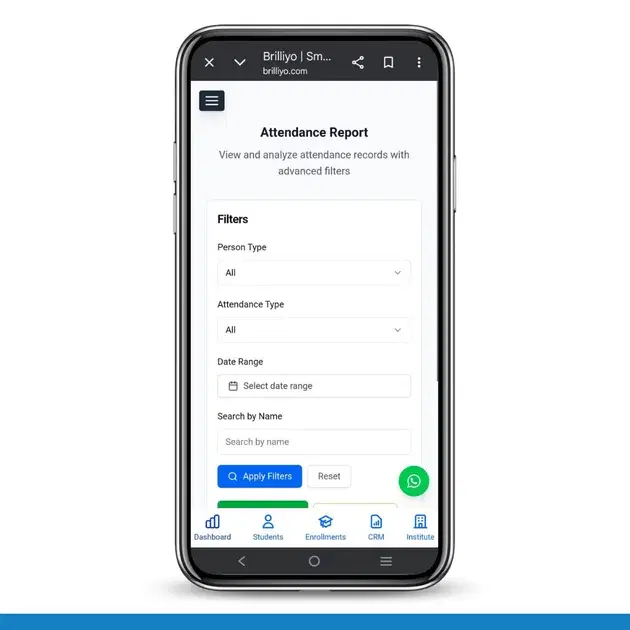
The Attendance Report feature helps you view, filter, and download attendance records for students and employees.
Filters & Options
- Person Type: Student / Employee / All
- Attendance Type: In-Time / Out-Time / All
- Date Range: Select dates
- Search by Name: Find specific person
- Apply Filters: Show filtered data
- Reset:
Clear filters
- Export to CSV: Download report
- Print Report: Print attendance
How to Use
- Go to Attendance → Attendance Report
- Select filters (Person Type, Attendance Type, Date)
- Click Apply Filters
- View attendance records
- Export or print if needed
In Short: Filter → View → Export / Print
Tags:
Brilliyo attendance reportLMS attendance featureattendance management softwaresmart attendance system
Share:
Related Documentation
CRM – Inbox
The Inbox feature in Brilliyo CRM allows you to manage and respond to conversations with your leads from one place. You can search for leads, open their conversations, and continue communication directly from the CRM.
2 min read
Report Card Module – User Guide
Before you begin, navigate to Courses → Report Card. This module allows you to create examinations, enter student marks, generate report cards, and prepare exam schedules.
3 min read
Brilliyo CRM Leads Feature
Managing admissions and inquiries becomes much easier with the Brilliyo CRM Leads feature. It helps schools, colleges, coaching centers, and educational institutes track every lead from the first inquiry to final enrollment.
3 min read