
Brilliyo Institute – Logs Feature
1. Overview
The Logs feature helps institutes monitor and review activities performed inside their Brilliyo account.
It maintains an activity history, such as user login attempts, actions performed, API requests, and their status. Institute administrators can use these records to understand who accessed the system, when an activity happened, and whether the action was successful or failed.
In simple words, Logs work like an activity register for your institute. They help maintain transparency, security, and accountability.
2. Why Should Institutes Use Logs?
The Logs feature is useful for several reasons:
Monitor Login Activity: Check when users log in to the institute account.
Improve Security: Identify unusual login activity or unexpected access attempts.
Track User Activities: Review which user performed an action.
Check Action Status: Understand whether an activity was successful or failed.
Troubleshoot Issues: Use technical details to investigate errors or failed requests.
Maintain Accountability: Keep a record of system activities for administrative review.
3. How to Use the Logs Feature
Follow these steps to review institute activity:
Step 1: Open Logs
Log in to your Brilliyo Institute account.
Navigate to the Logs section.
Open the activity log screen.
Step 2: Select the Time Period
You can review activity records according to the available time period.
For example:
Last Week
Other available date ranges, if provided.
Selecting a time period helps you review activities from a specific duration.
Step 3: Review the Log Records
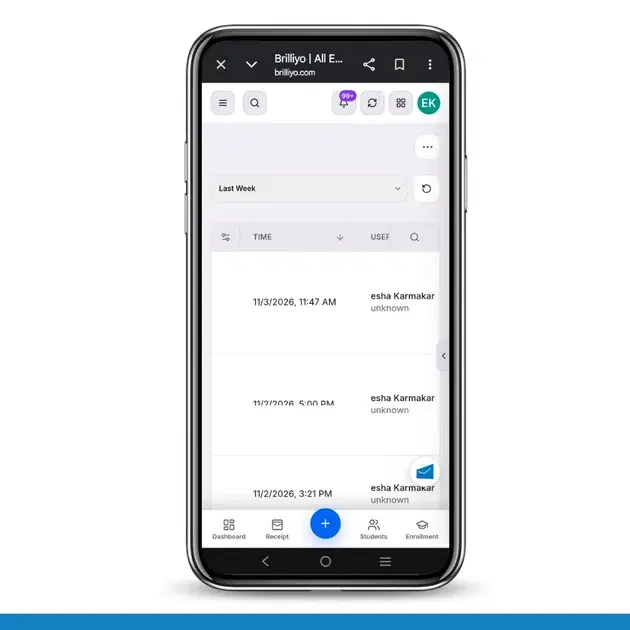
The Logs section displays activity records in a table.
The table contains the following details:
Column | Description |
|---|---|
Time | Date and time when the activity occurred |
User | Name of the user who performed the activity |
Action | Type of activity, such as LOGIN |
Resource | The resource or user role associated with the activity |
Status | Shows whether the activity was successful or failed |
Correlation | Unique ID used to trace a particular request |
Amount | Transaction amount, when applicable |
Endpoint | API method and endpoint used for the request |
4. Understanding a Log Entry
Let's understand one example from the provided log records.
Example Activity:
Field | Example |
|---|---|
Time | 02 November 2026, 11:42 AM |
User | Esha Karmakar |
Action | LOGIN |
Resource | Admin |
Status | Success |
Amount | Not applicable |
Endpoint | POST /api/auth/google |
What does this mean?
A user named Esha Karmakar performed a login activity.
The activity was associated with the Admin role.
The login request was recorded as successful.
The request was made through Google authentication.
This helps the institute administrator review account access history.
5. Understanding Important Log Details
Action
Shows what activity occurred. For example, LOGIN indicates a login-related activity.
Status
Indicates the result of the recorded action.
Success: The recorded action completed successfully.
Failed: The recorded action was unsuccessful.
Correlation ID
A unique identifier assigned to a request. It helps technical teams trace a particular activity when investigating an issue.
Endpoint
Shows the API request information, including the HTTP method and endpoint. For example, POST indicates that the request used the POST method.
IP Address
The IP address associated with the recorded request can help administrators and technical teams investigate unusual access activity.
6. How Logs Help with Security
Institutes should review logs regularly to monitor account activity.
For example:
If an unknown login attempt appears, the administrator can investigate it.
If a login fails repeatedly, the administrator can check whether there is an authentication issue.
If an unexpected activity appears, the administrator can review its user, time, and request details.
If a technical issue occurs, the correlation ID can help the support team investigate it.
Important: An unfamiliar IP address does not automatically mean unauthorized access. Network changes, VPNs, and authentication services can affect recorded IP information. Administrators should investigate before drawing conclusions.
7. Best Practices for Institute Administrators
Review login activity regularly.
Check failed or unusual activities.
Verify unfamiliar user activity.
Keep staff access and permissions properly managed.
Share the correlation ID with the technical support team when reporting an issue.
Never share passwords, OTPs, or confidential login information.
8. Benefits of the Logs Feature
Better visibility into institute account activity.
Improved security monitoring.
Easier investigation of login issues.
Better administrative accountability.
Useful technical information for troubleshooting.
A centralized record of system activities.
In short: Brilliyo Institute Logs help administrators monitor account activity, review login history, identify unusual events, and investigate technical issues. Regular log reviews help institutes maintain better control and security over their accounts.
Note: The examples above are based on the log fields and records you shared. The exact activities available depend on what the system records.