
Academics feature
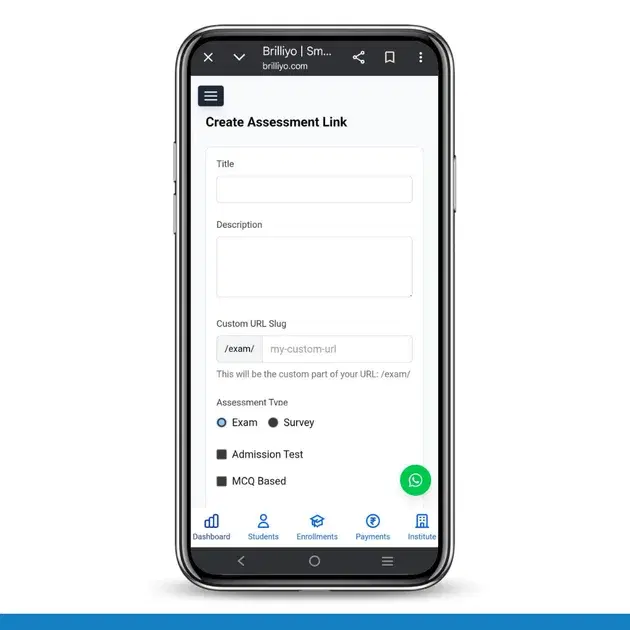
Brilliyo Academics – Create Assessment Link Feature
The Assessment Link feature in Brilliyo allows institutes to create online exams or surveys and share them through a custom link with students or candidates.
Step-by-Step Process
-
Enter Basic Details
- Title: Add exam or survey name
- Description: Write details about the assessment
-
Set Custom URL
- Define your custom link using URL slug
- Example:
/exam/my-custom-url
-
Select Assessment Type
- Choose Exam or Survey
- Optional settings:
- Admission Test
- MCQ Based
-
Enable Additional Settings
- Require Mobile Verification
- Manual Certificate Sending
- Automatic Certificate via WhatsApp
-
Set Schedule
- Start Date & Time
- End Date & Time
-
Select Question Source
- Use Existing Questions (Question Bank)
- Create New Questions (Manual or AI-based)
-
Select Questions
- Add questions like:
- What does SEO stand for? (MCQ | Marks: 10)
- PPC ka full form kya hai? (MCQ | Marks: 10)
- Add questions like:
-
Create Assessment Link
After completing all steps, click Create Assessment Link to generate a shareable exam/survey link.
In Short
- Create details → Set URL → Choose type
- Enable settings → Set schedule
- Add questions → Generate link
Tags:
Related Documentation
CRM – Inbox
The Inbox feature in Brilliyo CRM allows you to manage and respond to conversations with your leads from one place. You can search for leads, open their conversations, and continue communication directly from the CRM.
Report Card Module – User Guide
Before you begin, navigate to Courses → Report Card. This module allows you to create examinations, enter student marks, generate report cards, and prepare exam schedules.
Brilliyo CRM Leads Feature
Managing admissions and inquiries becomes much easier with the Brilliyo CRM Leads feature. It helps schools, colleges, coaching centers, and educational institutes track every lead from the first inquiry to final enrollment.