
CRM – Inbox
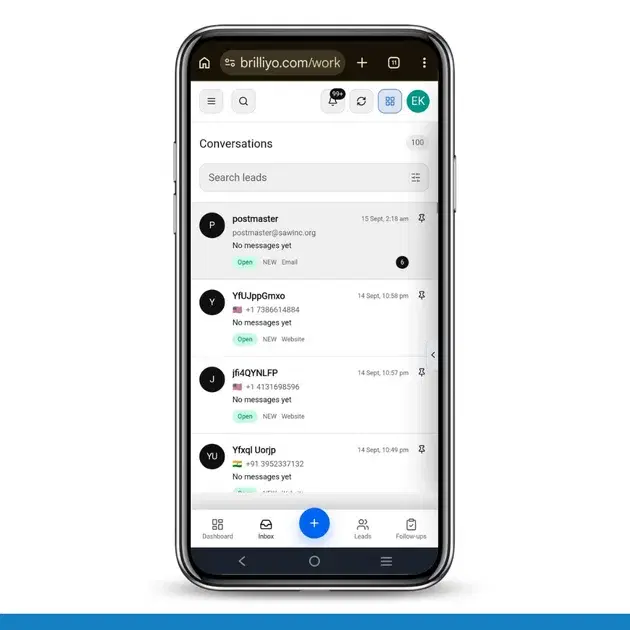
The Inbox feature in Brilliyo CRM allows you to manage and respond to conversations with your leads from one place. You can search for leads, open their conversations, and continue communication directly from the CRM.
How to Use CRM Inbox
Step 1: Open CRM
Log in to your Brilliyo account.
From the main menu, go to:
CRM → Inbox
This will open the CRM Inbox.
Step 2: View Conversations
After opening the Inbox, you can see the available Conversations.
The conversation list contains the leads who have interacted with your business.
You can select any conversation to view the communication with that lead.
Step 3: Search for a Lead
If you have many conversations and want to find a specific lead, use the Search Leads option.
Enter the lead's name or available lead information in the search field.
Brilliyo will show the matching leads or conversations.
Step 4: Select a Lead
Click on the required lead from the search results.
The selected conversation will open so that you can view the communication history with that lead.
Step 5: View the Conversation
After opening a conversation, you can review the previous messages exchanged with the lead.
This helps you understand the lead's enquiry and previous communication before responding.
Step 6: Reply to the Lead
Use the message area to type your response.
Enter the required message and send it to continue the conversation with the lead.
Step 7: Manage Lead Conversations
You can use the Inbox to regularly check and respond to your lead conversations.
This helps your team keep communication organized and ensures that lead enquiries are not missed.
Example
Suppose a student contacts your institute to ask about an online course.
You can:
CRM → Inbox → Search Leads → Select the Student → Open Conversation → Review Messages → Reply
You can then continue the conversation and assist the student with their enquiry.
Benefits of CRM Inbox
Manage lead conversations from one place
Quickly search for specific leads
View previous communication
Respond to lead enquiries easily
Keep conversations organized
Improve lead follow-up
Summary
The CRM Inbox helps you manage lead conversations efficiently. Instead of checking leads individually, you can use the Inbox to search, open, review, and respond to conversations from one place.
Tags:
Related Documentation
Brilliyo Institute – Roles & Access Management
The Roles & Access feature allows institutes to manage staff accounts, assign product access, and control permissions for different staff members. Institutes can decide which products and features each staff member can access based on their job responsibilities.
Report Card Module – User Guide
Before you begin, navigate to Courses → Report Card. This module allows you to create examinations, enter student marks, generate report cards, and prepare exam schedules.
Brilliyo CRM Leads Feature
Managing admissions and inquiries becomes much easier with the Brilliyo CRM Leads feature. It helps schools, colleges, coaching centers, and educational institutes track every lead from the first inquiry to final enrollment.