
Brilliyo CRM Leads Feature
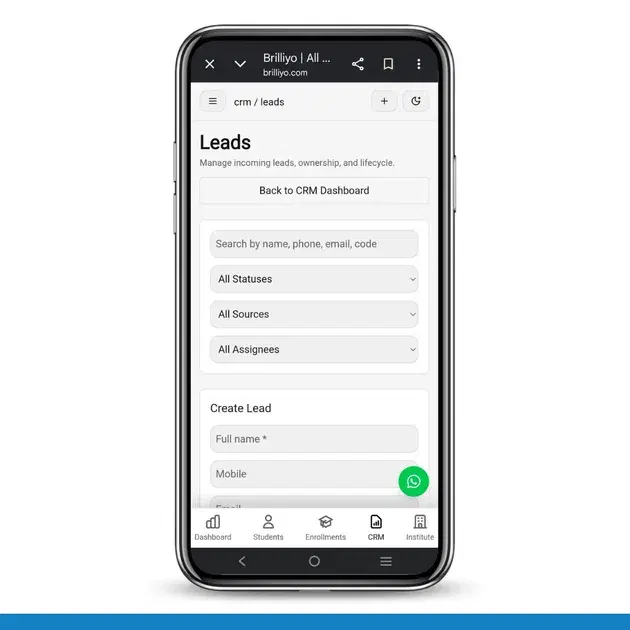
Brilliyo CRM Leads Feature
Manage incoming leads, track ownership, and monitor the complete lead lifecycle from inquiry to admission.
Step 1: Open the Leads Module
Navigate to:
CRM → Leads
This section allows institutes to manage all student inquiries and admission leads from a centralized dashboard.
Step 2: Search Existing Leads
Use the search bar to find leads quickly using:
- Name
- Mobile Number
- Email Address
- Lead Code
This helps users locate specific leads without browsing the entire list.
Step 3: Filter Leads
Leads can be filtered using multiple criteria.
Status Filter
View leads based on their current stage in the admission process.
- New
- Contacted
- Follow-up
- Interested
- Converted
- Closed
Source Filter
Track where leads originated.
- Website
- Referral
- Manual Entry
Assignee Filter
View leads assigned to specific counselors or admission team members.
Step 4: Create a New Lead
Click Create Lead and enter the required information.
Full Name
Enter the student's or parent's name.
Mobile
Add the contact number.
Enter the email address.
Source
Select the lead source.
- Manual
- Website
- Social Media
- Advertisement Campaign
Source Label
Add a custom label to identify the campaign or source more accurately.
- Summer Admission Campaign
- Facebook Lead Form
- Website Inquiry
Auto Assign
Automatically assign the lead to a counselor or team member.
Follow-Up Date and Time
Schedule the next follow-up while creating the lead.
Notes
Record important details such as:
- Course interest
- Parent discussion summary
- Fee inquiry information
- Special requirements
Click Create Lead to save the lead.
Step 5: Manage the Lead Lifecycle
After creation, leads can be updated throughout the admission journey.
Typical workflow:
New Lead → Contacted → Follow-Up → Interested → Admission Confirmed → Converted
This helps institutes track every inquiry and improve conversion rates.
Step 6: Track Lead Ownership
Each lead can be assigned to a specific counselor or admission executive.
Benefits include:
- Clear accountability
- Better follow-up management
- Reduced duplicate communication
- Improved admission tracking
Administrators can easily monitor lead ownership and activity.
Step 7: Follow-Up Management
Schedule and manage follow-ups directly within the CRM.
Users can:
- Schedule calls
- Set reminders
- Record discussions
- Add follow-up notes
- Update lead status
This ensures no lead is missed during the admission process.
Step 8: Monitor Lead Performance
Institutes can analyze lead data to understand admission performance.
Track:
- Total inquiries received
- Lead sources
- Counselor performance
- Conversion rates
- Pending follow-ups
These insights help improve admission strategies and marketing efforts.
Conclusion
The Brilliyo CRM Leads module helps educational institutes capture, organize, assign, track, and convert leads efficiently.
By managing the complete lead lifecycle in one place, institutes can improve follow-ups, increase admissions, and streamline the enrollment process.
Tags:
Related Documentation
Brilliyo System Admin
The Access Control feature allows the System Admin to manage user accounts, assign product access, control permissions, and review access requests.
Brilliyo Institute – Notifications
The Notifications feature helps institute administrators and staff stay updated about important activities happening inside their Brilliyo workspace. It displays alerts related to student management, financial transactions, CRM and lead management, emails, and other activities that users have permission to view. In simple words, Notifications work like an activity alert center, where users can check important updates without manually visiting every section of Brilliyo.
Brilliyo Institute – Payment Settings
The Payment Settings feature allows institutes to configure how they receive payments from students who purchase their courses or classes. Institutes can link their bank accounts to receive payments directly or use the manual settlement mode, where Brilliyo collects payments and settles them manually. This feature helps institutes manage course payment collection, track earnings, and monitor payouts.