
Academics Feature – Circular Management
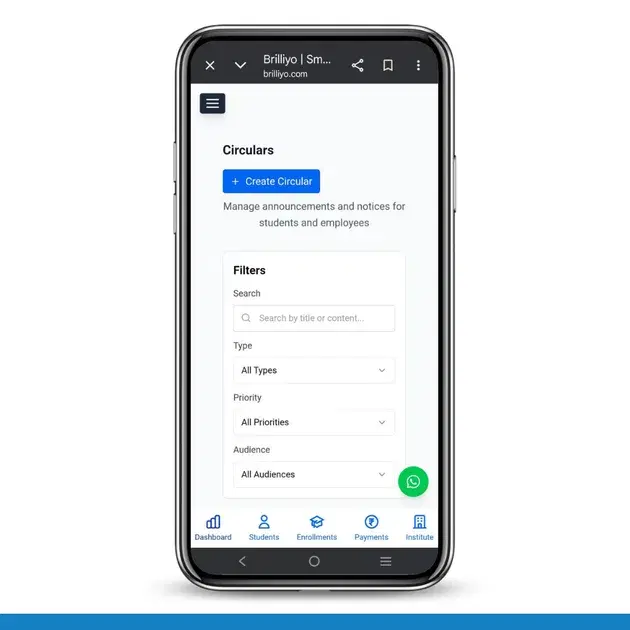
Academics Feature – Circular Management
The Circular Management feature in Brilliyo Academics helps institutes create and manage announcements like notices, holidays, events, and exam updates for students and employees. It allows administrators to publish important information in a structured way and control who can view the circular.
Key Options in Circular Feature
- Create Circular
- Set Target Audience
- Set Visibility & Timing
- Attach Files
- Filter Circulars
1. Create Circular (Add Announcement)
Administrators can create circulars to share updates such as holidays, exam notices, events, or general announcements.
How to Create a Circular
Step-by-Step Process
- Go to Academics → Circulars.
- Click Create Circular.
- Enter the Title of the circular.
- Select the Circular Type (Notice, Holiday, Exam, etc.).
- Add the Content or message of the circular.
2. Set Target Audience
Choose who should receive the circular.
- Students
- Employees
- Both
This ensures the announcement reaches the right audience.
3. Set Visibility & Timing
Control when the circular appears.
- Start Date – When the circular becomes visible
- End Date (Optional) – When it stops showing
- Priority Level – Normal or Important notice
- Branch Selection – Specific branch or all branches
You can also show the circular as a banner or highlight on the dashboard.
4. Attach Files
Administrators can upload supporting files such as:
- Images (JPG, PNG)
- Documents (DOC, DOCX)
5. View and Filter Circulars
All circulars appear in the Circular List, where administrators can manage announcements.
Displayed information includes:
- Circular Title
- Circular Type
- Attachments
Filters available:
- Search by Title or Content
- Type Filter
- Priority Filter
- Audience Filter
In Short
- Create Circular → Publish announcements and notices.
- Target Audience → Send circulars to students, employees, or both.
- Visibility & Timing → Control start and end dates.
- Attachments → Upload PDFs or documents.
- Filter Circulars → Easily find and manage circulars.
The Circular Management feature in Brilliyo Academics helps institutes share updates quickly and keep communication organized.
Tags:
Related Documentation
CRM – Inbox
The Inbox feature in Brilliyo CRM allows you to manage and respond to conversations with your leads from one place. You can search for leads, open their conversations, and continue communication directly from the CRM.
Report Card Module – User Guide
Before you begin, navigate to Courses → Report Card. This module allows you to create examinations, enter student marks, generate report cards, and prepare exam schedules.
Brilliyo CRM Leads Feature
Managing admissions and inquiries becomes much easier with the Brilliyo CRM Leads feature. It helps schools, colleges, coaching centers, and educational institutes track every lead from the first inquiry to final enrollment.