
Academics Feature – Create Question
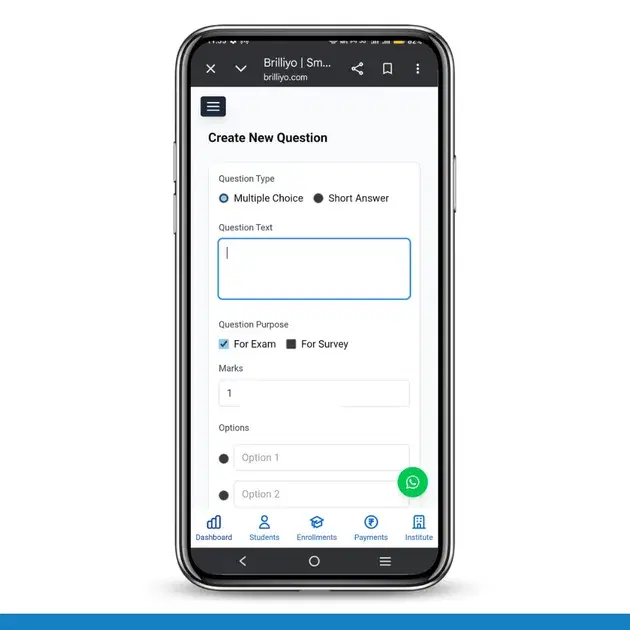
Academics Feature – Create Question (Exam/Survey)
The Create Question feature in Brilliyo Academics (Exam/Survey module) allows institutes to create questions for online exams and surveys. Administrators or teachers can design questions, set marks, choose question types, and add options for assessments.
This feature helps in building structured question banks for exams and feedback surveys.
Key Options in Create Question
- Question Type Selection
- Question Text
- Question Purpose (Exam/Survey)
- Marks Allocation
- Options (for MCQs)
How to Create a Question (Step-by-Step)
1. Navigate to Create Question
- Go to Academics → Exam/Survey
- Click on Create Question
2. Select Question Type
Choose how you want the question to appear:
- Multiple Choice (MCQ) → Students select one correct answer
- Short Answer → Students type their answer
3. Enter Question Text
- In the Question Text field, type your question.
4. Select Question Purpose
Choose where the question will be used:
- For Exam → Used in tests with marks
- For Survey → Used for feedback
5. Set Marks
- Enter the marks/points for the question
6. Add Options (For MCQ Only)
- Enter Option 1, Option 2, etc.
- Click Add Option to add more choices
- Select the correct answer using the radio button
7. Create Question
- Click on Create Question
✅ The question will be successfully saved and ready to use in exams or surveys.
In Short
- Go to Exam/Survey → Create Question
- Select Question Type (MCQ / Short Answer)
- Enter Question Text
- Choose Exam or Survey
- Set Marks
- Add Options (for MCQ)
- Click Create Question
The Create Question feature in Brilliyo Academics makes it easy to build structured and flexible exam and survey questions.
Tags:
Related Documentation
CRM – Inbox
The Inbox feature in Brilliyo CRM allows you to manage and respond to conversations with your leads from one place. You can search for leads, open their conversations, and continue communication directly from the CRM.
Report Card Module – User Guide
Before you begin, navigate to Courses → Report Card. This module allows you to create examinations, enter student marks, generate report cards, and prepare exam schedules.
Brilliyo CRM Leads Feature
Managing admissions and inquiries becomes much easier with the Brilliyo CRM Leads feature. It helps schools, colleges, coaching centers, and educational institutes track every lead from the first inquiry to final enrollment.