
Academics Feature – Homework Management
Academics Feature – Homework Management
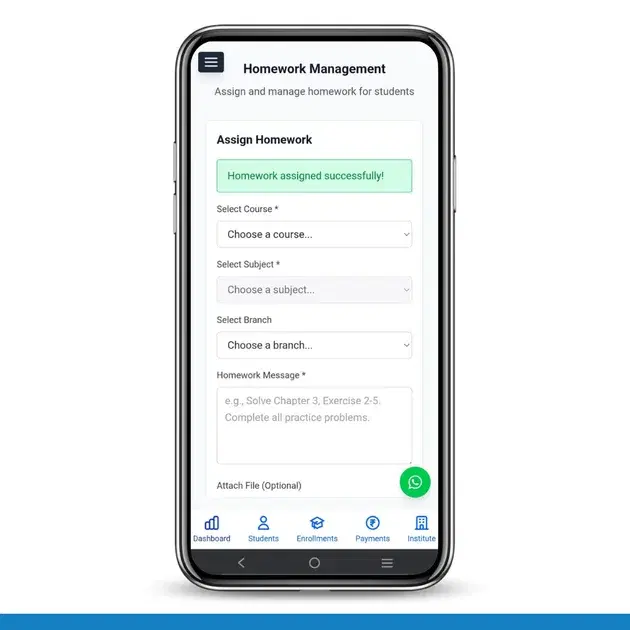
The Homework Management feature in Brilliyo Academics helps teachers and administrators easily assign and manage homework for students. It allows institutes to organize assignments by course, subject, and branch, ensuring students receive the correct tasks.
This feature improves communication between teachers and students while keeping assignments properly organized.
Key Options in Homework Feature
- Assign Homework
- Attach Homework Files
- View Assigned Homework
- Filter Homework
1. Assign Homework
Teachers can quickly create homework assignments for students.
How to Assign Homework
- Go to Academics → Homework.
- Select the Course.
- Choose the Subject.
- Select the Branch (if required).
- Enter the Homework Message or instructions.
- Click Assign Homework.
The homework will be assigned instantly to the selected students.
2. Attach Homework Files
Teachers can upload files with homework instructions such as:
- DOC / DOCX
- JPG / PNG
- TXT
This helps students understand assignments more clearly.
3. View Assigned Homework
All assigned homework appears in the homework list showing:
- Assigned Date
- Status (Active)
- Actions (Delete)
4. Filter Homework
Teachers can quickly find assignments using filters:
- Filter by Course
- Filter by Subject
In Short
- Assign Homework → Create assignments for students.
- Attach Files → Share study materials with homework.
- View Homework → Track assigned homework.
- Filter Homework → Easily find assignments by course or subject.
The Homework feature in Brilliyo Academics helps institutes manage student assignments efficiently and keep academic tasks well organized.
Tags:
Related Documentation
CRM – Inbox
The Inbox feature in Brilliyo CRM allows you to manage and respond to conversations with your leads from one place. You can search for leads, open their conversations, and continue communication directly from the CRM.
Report Card Module – User Guide
Before you begin, navigate to Courses → Report Card. This module allows you to create examinations, enter student marks, generate report cards, and prepare exam schedules.
Brilliyo CRM Leads Feature
Managing admissions and inquiries becomes much easier with the Brilliyo CRM Leads feature. It helps schools, colleges, coaching centers, and educational institutes track every lead from the first inquiry to final enrollment.