
Brilliyo Placement Engine – Add Students
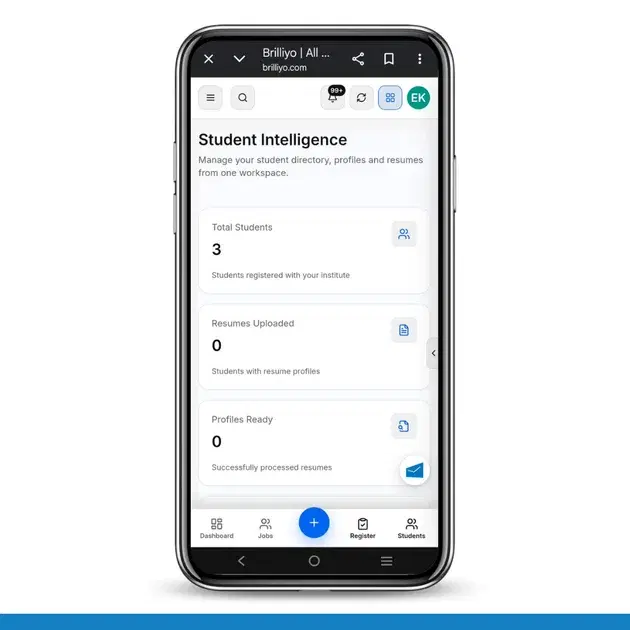
The Student Intelligence feature in Brilliyo Placement Engine helps institutes manage their student directory, student profiles, and resumes from one workspace. It allows placement teams to monitor resume uploads, check profile readiness, and prepare eligible students for job matching.
1. Student Intelligence Dashboard
When you open Student Intelligence, the dashboard displays key student and resume statistics.
Total Students
Shows the total number of students registered with your institute.
Example: 3 students.
Resumes Uploaded
Displays the number of students who have uploaded their resumes.
Profiles Ready
Shows the number of resumes that have been successfully processed and are ready for placement intelligence.
Resume Required
Shows how many students are still waiting to upload their resumes.
Example: 3 students.
2. How to Add Students to Placement Management
The Student Intelligence workspace displays students registered with your institute. To manage them for placement activities, follow these steps.
Step 1: Open Student Intelligence
Open the Brilliyo Placement Engine and navigate to Student Intelligence.
Step 2: Review the Student Directory
Scroll to the Student Directory section to view the students listed in your institute.
The directory displays:
Student – Student name.
Student ID – Unique student identification number.
Contact – Student contact number.
Resume – Resume upload status.
Profile Status – Current resume or profile readiness status.
Action – Option to open the student's profile.
Step 3: Search for a Student
Use the Search students... field to find a particular student in the directory.
This helps you locate student records quickly.
Step 4: View the Student Profile
Click View Profile in the Action column to open the student's profile and review the available information.
Step 5: Upload Student Resumes
Click Upload Resumes to upload student resumes for processing.
Resume information is processed into structured data, including:
Skills
Education
Experience
Projects
This information supports placement intelligence and job matching.
Step 6: Check Resume Processing Status
After uploading resumes, review the dashboard to check the updated resume and profile readiness information.
Students need an uploaded and successfully processed resume before they can be selected for job matching.
3. Generate Placement Matches
The Student Intelligence workspace also provides a Generate Placement Matches section.
Follow these steps:
Check which students have successfully processed resumes.
Select the eligible students from the available list.
Use Select all students with resumes if you want to select all eligible students.
Check the selected student count.
Click Generate Matches to generate job matches for the selected students.
If no students are ready for matching, the system displays No students are ready for matching. Upload and process student resumes before attempting to generate matches.
4. Example: Understanding Student Status
Student | Resume Status | Profile Status |
|---|---|---|
Riya | Required | Awaiting resume |
Sima | Required | Awaiting resume |
Aditi | Required | Awaiting resume |
In this example, all three students are awaiting resume uploads. Their resumes must be uploaded and successfully processed before they can be selected for placement matching.
5. Why Use Student Intelligence?
Manage student records from one workspace.
Quickly search and review student profiles.
Track which students still need to upload resumes.
Convert resumes into structured information about skills, education, experience, and projects.
Identify students ready for placement matching.
Generate job matches for students with successfully processed resumes.
Quick Navigation
Brilliyo Placement Engine → Student Intelligence → Student Directory → View Profile → Upload Resumes → Check Processing Status → Generate Matches
Summary: Student Intelligence helps institutes organize student profiles, manage resume uploads, monitor processing status, and prepare eligible students for job matching through Brilliyo Placement Engine.
Tags:
Related Documentation
CRM – Integrations
The Integrations feature in Brilliyo CRM allows you to connect your website, WhatsApp, email, and social pages with your CRM lead pipeline. This helps bring leads from external channels into your CRM for centralized lead management.
Student Reports – Step-by-Step Guide
The Student Reports feature in Brilliyo helps institutes view detailed student fee payment history, payment modes, and total paid amounts. Administrators can also download reports in Excel format for record keeping and analysis.
Dropped Out feature
The Dropped Out feature in Brilliyo helps institutes manage students who are no longer continuing their studies. This feature also allows administrators to create manual journal entries for financial adjustments related to the studen