
Dropped Out feature
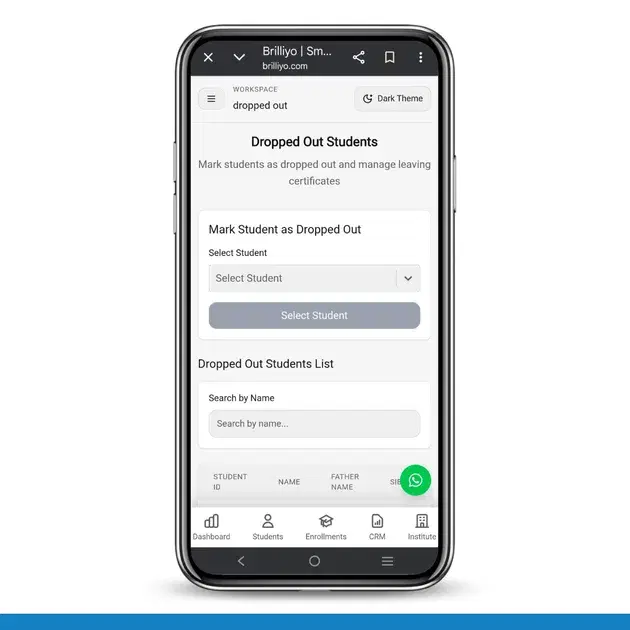
Dropped Out Students – Step-by-Step Guide
The Dropped Out feature in Brilliyo helps institutes manage students who are no longer continuing their studies. This feature also allows administrators to create manual journal entries for financial adjustments related to the student.
How to Mark a Student as Dropped Out
1. Open Dropped Out Section
- Go to the dashboard
- Click on the 3 Dots Menu
- Select Dropped Out
2. Select Student
- Click on Select Student
- Choose the student you want to mark as dropped out
3. Create Manual Journal Entry
After selecting the student, the Create Manual Journal Entry section will appear.
4. Select Date
- Choose the transaction date
5. Select Branch
- Select the branch from the dropdown list
- Example: Esha Digimaster Academy
6. Add Debit Entries
- Click on + Add Debit
- Select the required ledger
- Enter the debit amount
Examples of ledgers:
- Accounts Receivable
- Bank
- Cash
- Tuition Fee
- Student Ledger
7. Add Credit Entries
- Click on + Add Credit
- Select the appropriate ledger
- Enter the credit amount
8. Balance the Transaction
- Ensure total debits and total credits are equal
- The system will display “Transaction is balanced”
9. Add Narration
- Enter remarks or notes related to the dropout entry
10. Create Entry
- Click on Create Entry
- The student will be marked as dropped out successfully
Result
The student dropout record and related financial adjustments will be saved successfully in the system.
Tags:
Related Documentation
CRM – Integrations
The Integrations feature in Brilliyo CRM allows you to connect your website, WhatsApp, email, and social pages with your CRM lead pipeline. This helps bring leads from external channels into your CRM for centralized lead management.
Student Reports – Step-by-Step Guide
The Student Reports feature in Brilliyo helps institutes view detailed student fee payment history, payment modes, and total paid amounts. Administrators can also download reports in Excel format for record keeping and analysis.
Fee Defaulters – Step-by-Step Guide
The Fee Defaulters feature in Brilliyo helps institutes track students who have pending or unpaid fees. It allows you to monitor outstanding dues, filter records, and quickly collect fees from students.