
Fee Defaulters – Step-by-Step Guide
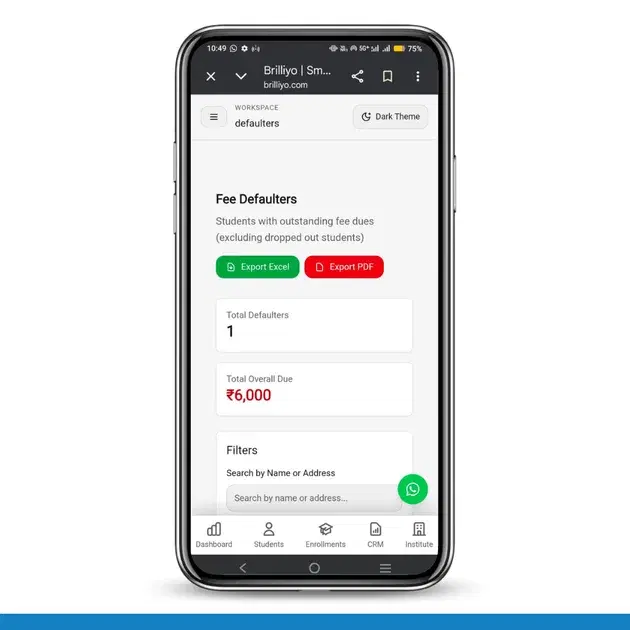
Fee Defaulters – Step-by-Step Guide
The Fee Defaulters feature in Brilliyo helps institutes track students who have pending or unpaid fees. It allows you to monitor outstanding dues, filter records, and quickly collect fees from students.
How to Use Fee Defaulters Feature
1. Open Fee Defaulters
- Go to the dashboard
- Click on Fee Defaulters
2. View Overall Summary
- Total Defaulters – Shows the total number of students with pending fees
- Total Overall Due – Shows the total pending amount
3. Search Students
- Use the search box to find students by name or address
4. Filter by Course
- Click on Filter by Course
- Select the class or course you want to check
5. Check Student Fee Details
- View Student ID
- Check Student Name
- View Guardian Name
- Check Mobile Number and Address
- View Class and Overall Due Amount
6. Collect Fees
- Click on Collect Fee
- Enter payment details
- Complete the fee collection process
7. Export Reports
- Export the data to Excel
- Export the report to PDF
Result
The Fee Defaulters feature helps institutes easily identify students with pending fees and manage fee collection efficiently.
Tags:
Related Documentation
CRM – Integrations
The Integrations feature in Brilliyo CRM allows you to connect your website, WhatsApp, email, and social pages with your CRM lead pipeline. This helps bring leads from external channels into your CRM for centralized lead management.
Student Reports – Step-by-Step Guide
The Student Reports feature in Brilliyo helps institutes view detailed student fee payment history, payment modes, and total paid amounts. Administrators can also download reports in Excel format for record keeping and analysis.
Dropped Out feature
The Dropped Out feature in Brilliyo helps institutes manage students who are no longer continuing their studies. This feature also allows administrators to create manual journal entries for financial adjustments related to the studen