
Students Feature – Add Student
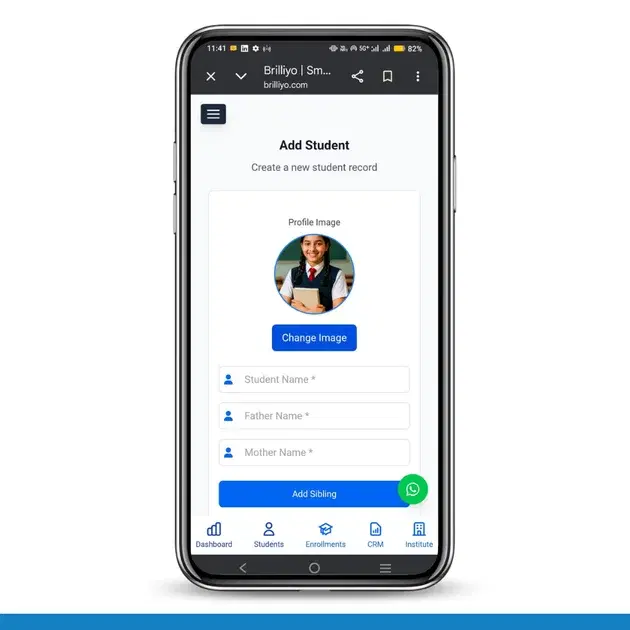
Students Feature – Add Student
The Add Student feature in Brilliyo allows institutions to register new students by entering their personal, academic, and contact details.
Step-by-Step Process
1. Go to Add Student
- Navigate to Students → Add Student
2. Upload Profile Image
- Click on Upload Image
- Add the student’s profile photo
3. Enter Basic Details
- Student Name*
- Father Name*
- Mother Name*
- Click Add Sibling (optional)
4. Enter Additional Details
- Aadhaar Number
- Family ID
- Mobile Number
- Address
5. Select Branch & Session
- Select Branch*
- Choose Session (e.g., 2026–2027)
6. Add Opening Balance (Optional)
- Debit (Due): Amount student owes
- Credit: Advance payment by student
7. Select Additional Services
- Hostel Required
- Transport Required
8. Add Student
- Click on Add Student
✔ The student will be successfully added to the system.
Tags:
Related Documentation
Brilliyo Placement Engine – Add Students
The Student Intelligence feature in Brilliyo Placement Engine helps institutes manage their student directory, student profiles, and resumes from one workspace. It allows placement teams to monitor resume uploads, check profile readiness, and prepare eligible students for job matching.
CRM – Integrations
The Integrations feature in Brilliyo CRM allows you to connect your website, WhatsApp, email, and social pages with your CRM lead pipeline. This helps bring leads from external channels into your CRM for centralized lead management.
Student Reports – Step-by-Step Guide
The Student Reports feature in Brilliyo helps institutes view detailed student fee payment history, payment modes, and total paid amounts. Administrators can also download reports in Excel format for record keeping and analysis.